
Back to All Works
Smart Ticketing BackOffice
A scalable back-office platform for managing public transport operations across multiple organizations and administrative levels.
Scope
Enterprise Product Design · Information Architecture · Design System
Platform
Web Application
Timeline
10 months
YEAR
2024

01/
Background
Project Context
Smart Ticketing is an internal web platform used to manage transport organizations, fare products, passengers, reporting, and support operations.
The platform supports multiple administrative levels, each responsible for different aspects of transport operations. Rather than building separate interfaces for each role, the goal was to create a unified experience that adapts to role-specific permissions while maintaining consistency across the product.
02/
Problem
The Challenge
Designing a back-office platform for public transport providers required balancing flexibility with consistency across multiple administrative levels. Different users needed access to different tools, permissions, and workflows while working within the same system.
Several design challenges shaped the project:
- Supporting multiple permission levels within one product
- Creating consistent navigation across different user roles
- Simplifying complex administrative workflows
- Building reusable UI patterns for future scalability
- Maintaining consistency across a growing platform
03/
Roles & Access
Role-Based Navigation
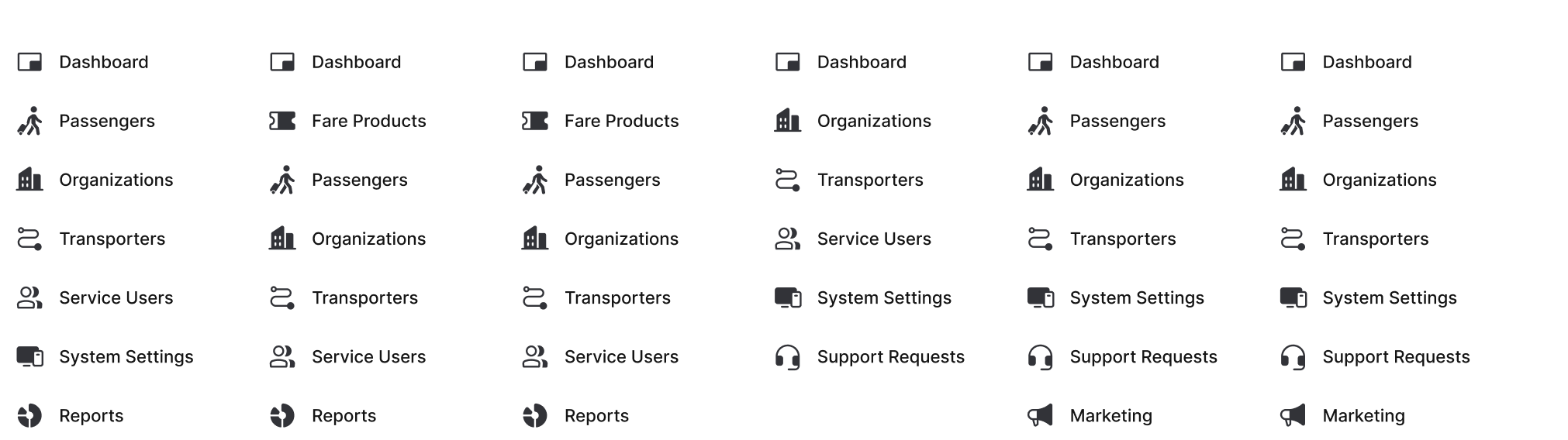
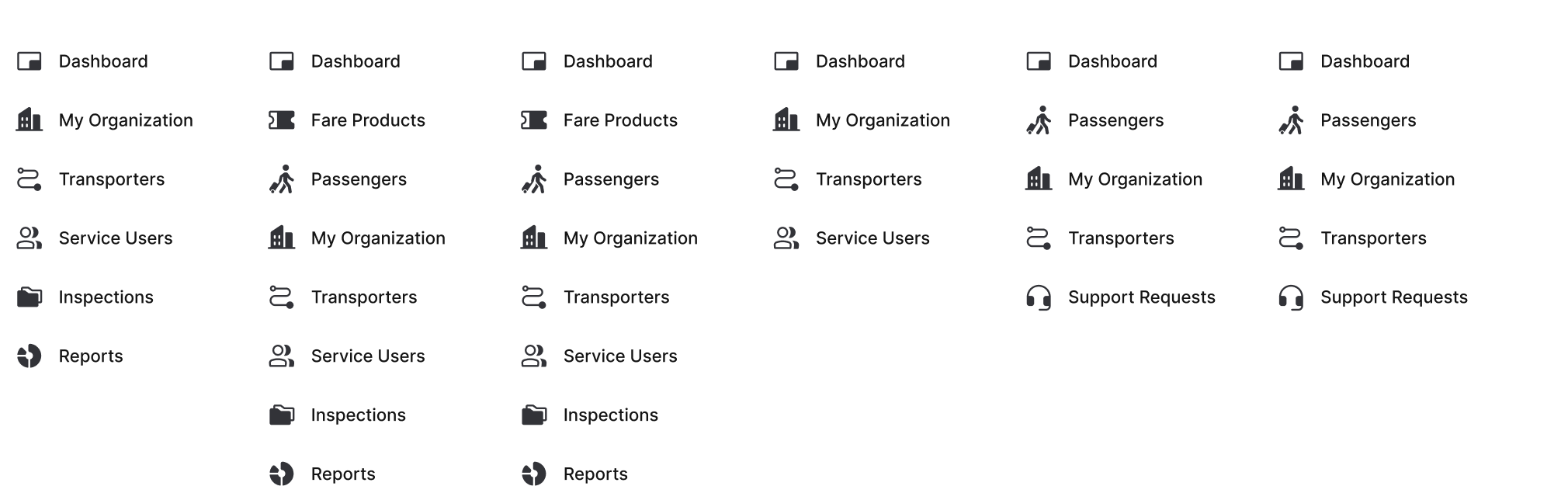
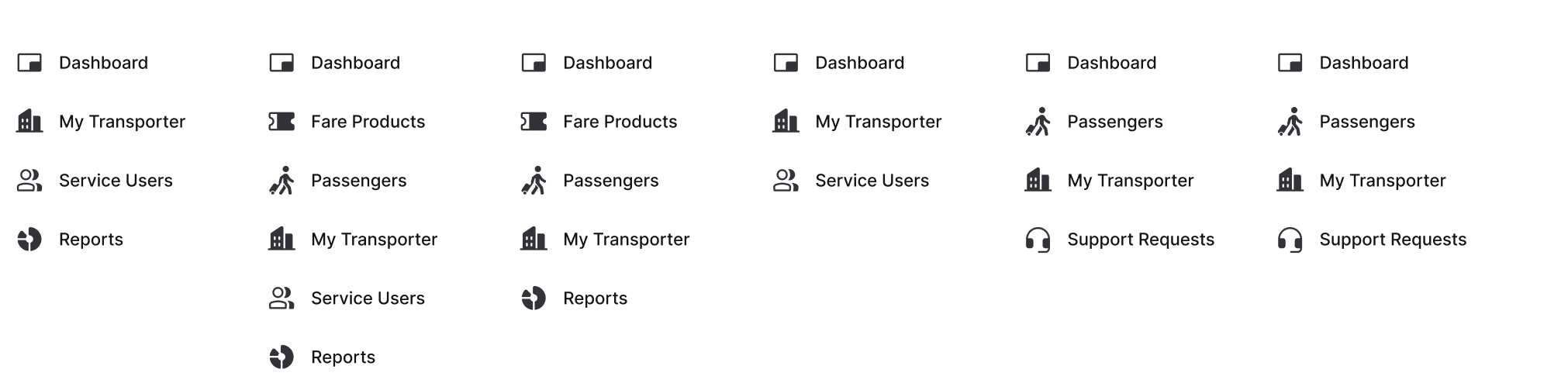
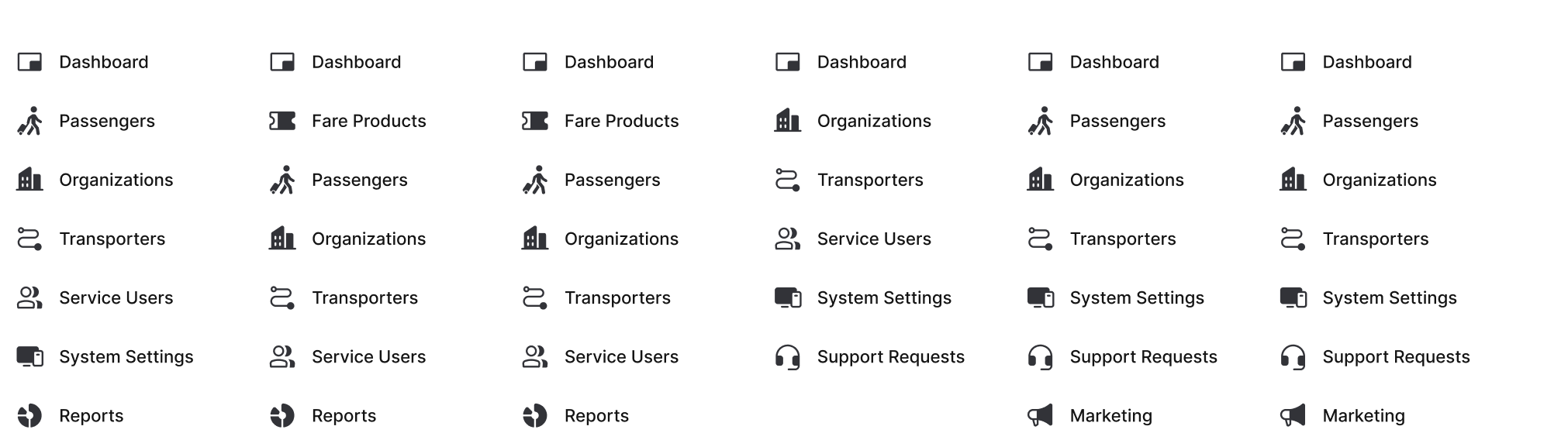
Although users share the same product, each administrative level requires different responsibilities, permissions, and workflows. The navigation adapts accordingly while preserving a consistent mental model across the platform.
Platform Level
Provides centralized administration for managing organizations, global settings, reporting, and platform-wide configurations.
Organization Level
Supports day-to-day management of transport networks, fare products, inspections, and passengers within a single organization.
Transporter Level
Focuses on operational workflows such as passenger management, fare products, reporting, and support for individual transport providers.
04/
Setup
Organization Onboarding
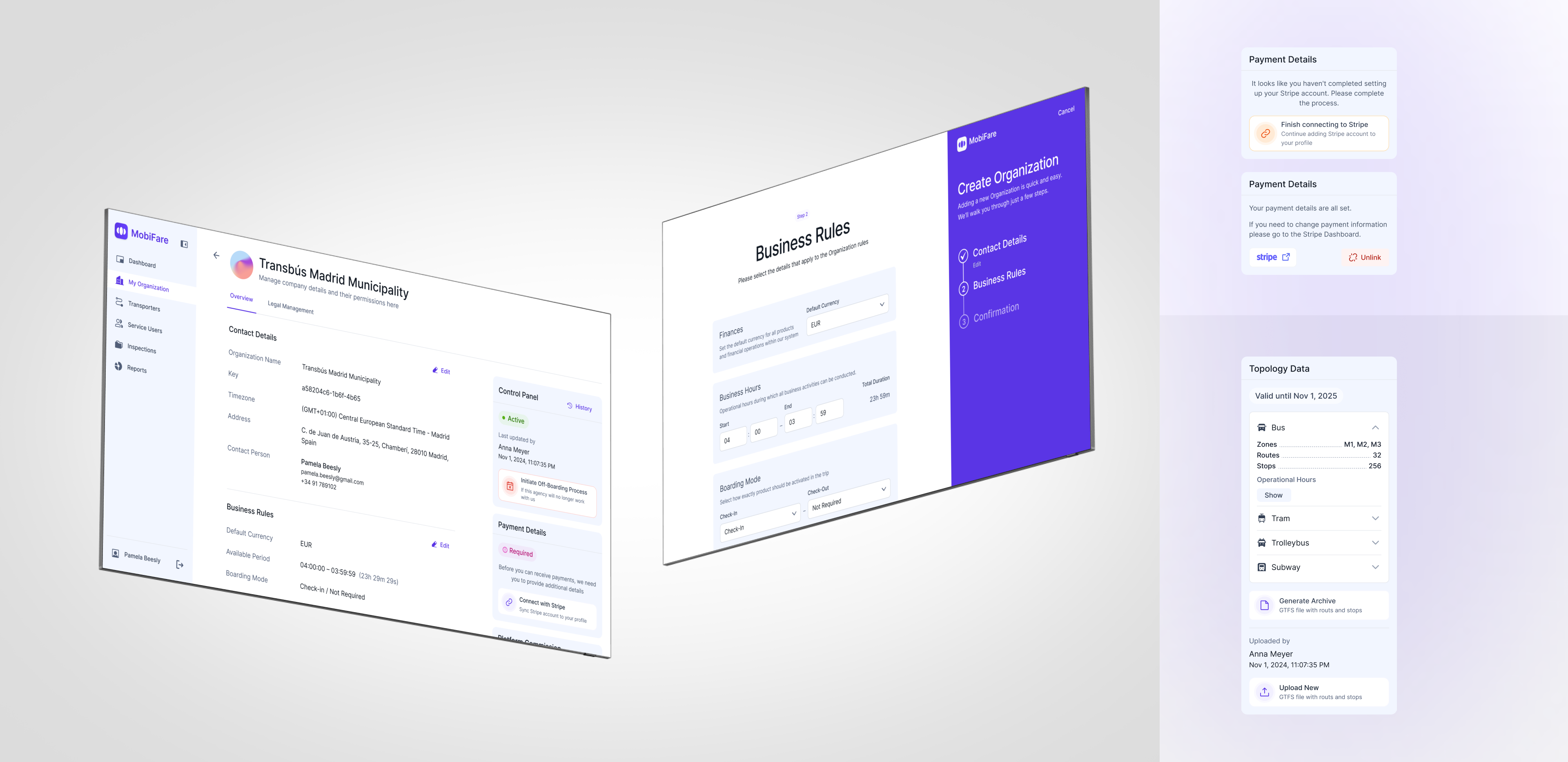
Setting up a new organization involves multiple operational steps, including platform configuration, organization setup, payment integration, document verification, and transport network configuration.
The experience brings these related tasks into a structured workflow that helps administrators complete setup efficiently.
05/
Ticket Management
Fare Product Management
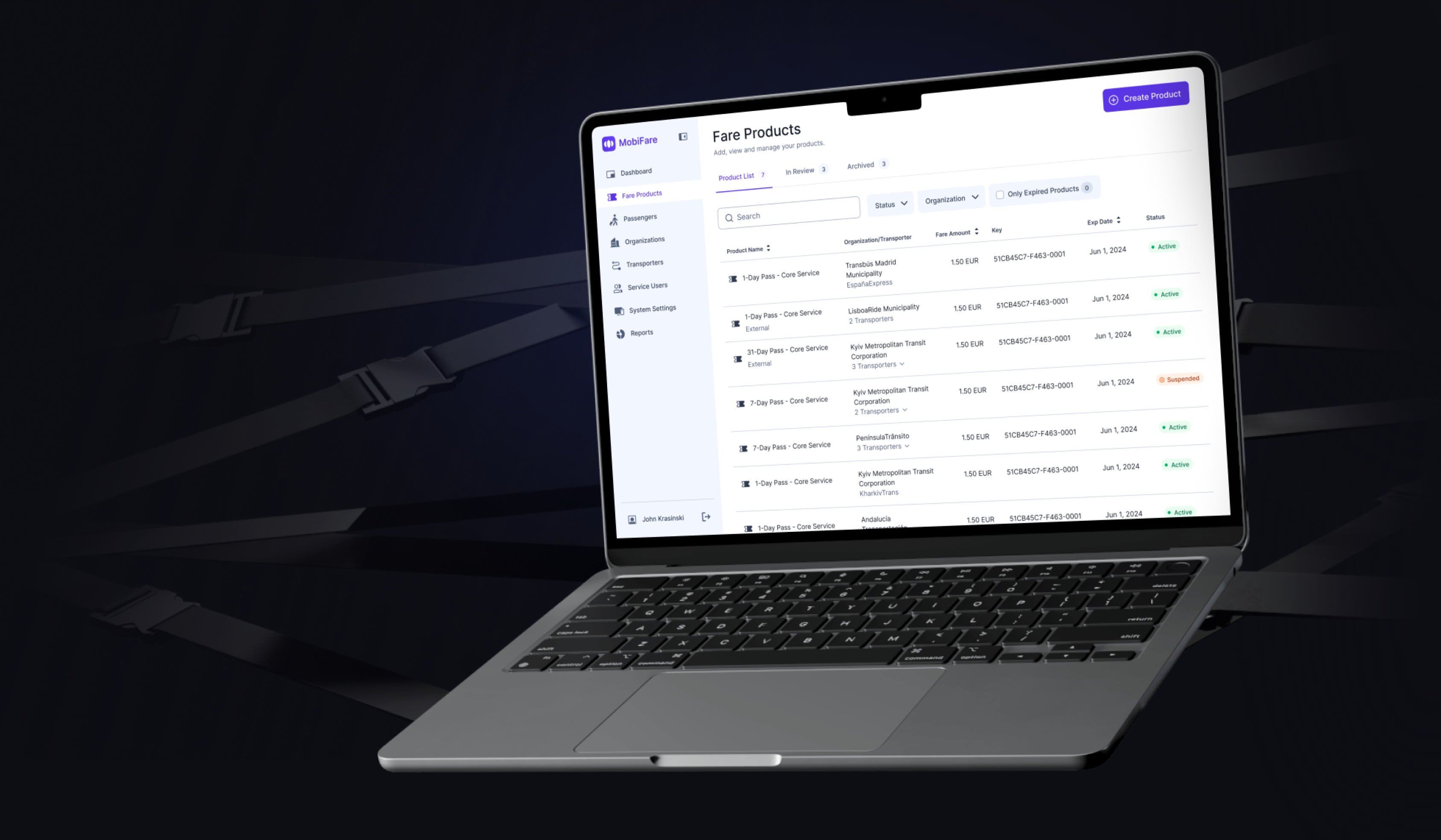
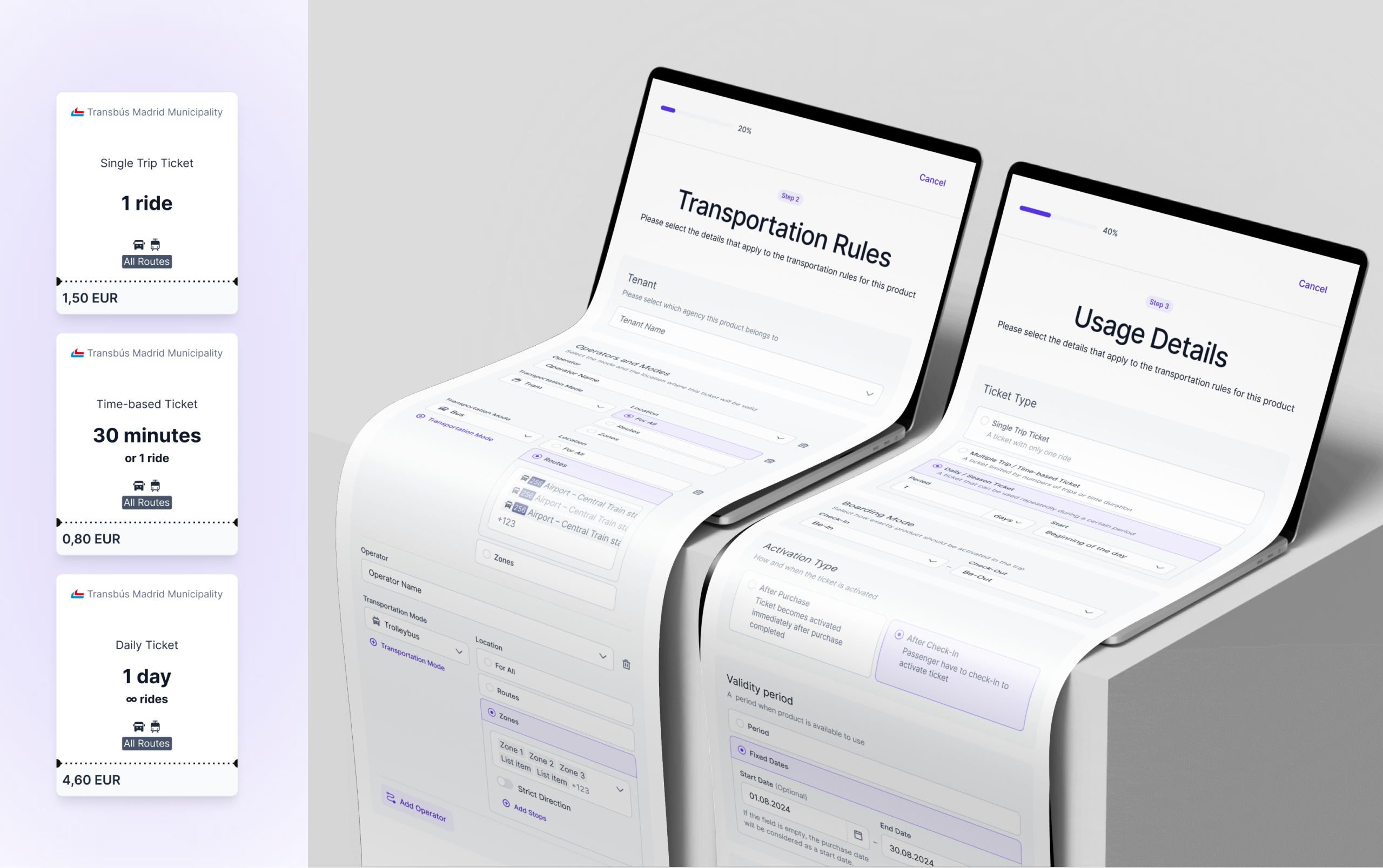
Fare products are one of the platform's core management areas.
The interface was designed to simplify creating, editing, and reviewing transport tickets while maintaining consistency across different organizations and administrative levels.
06/
Support & Refunds
Support & Refund Tools
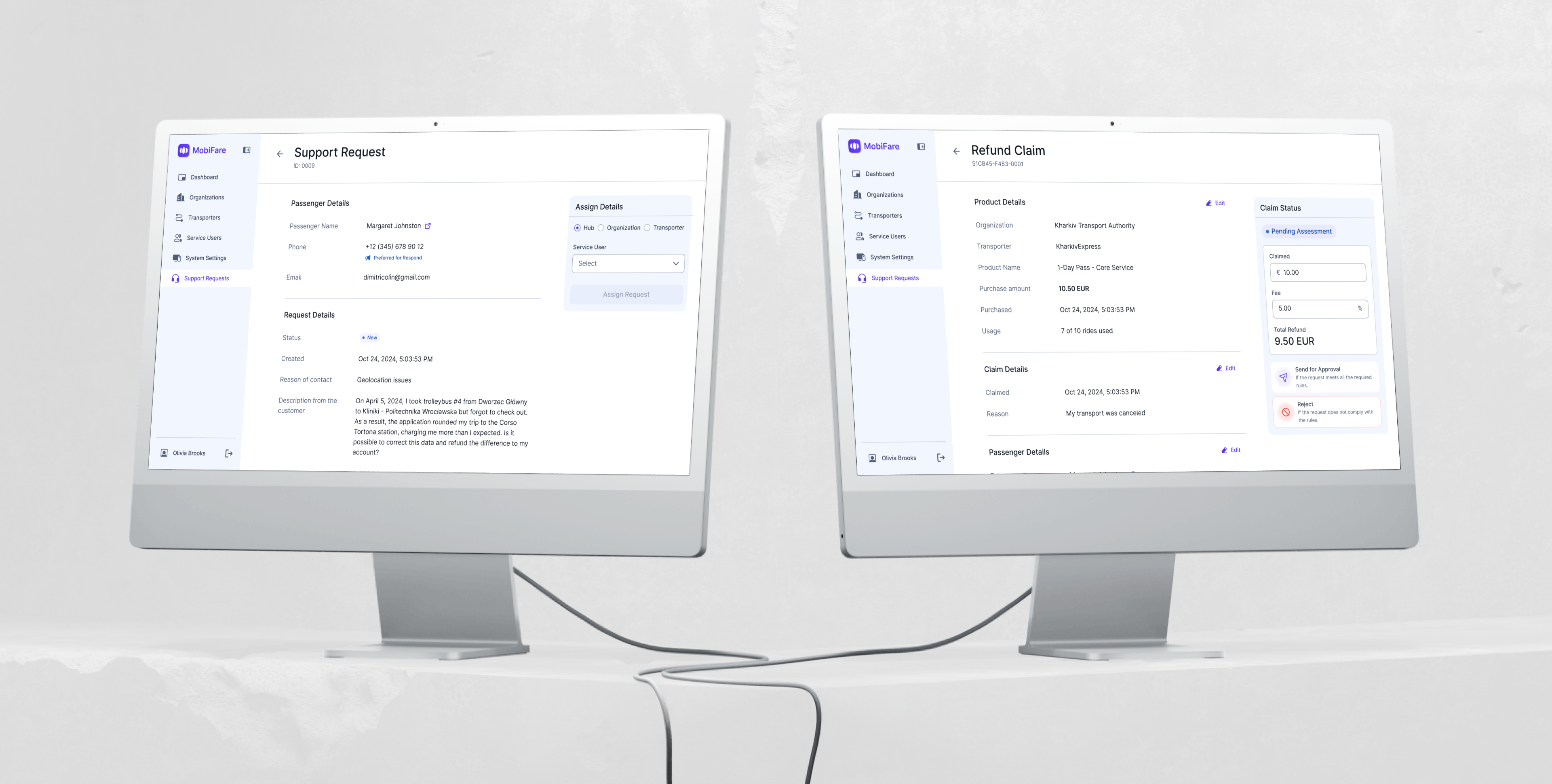
Customer support teams need fast access to passenger information and operational tools when resolving issues.
The platform centralizes support requests and refund workflows, helping operators handle common administrative tasks from a single interface.
This reduces context switching and enables faster issue resolution for support teams.
07/
Operational Reports
Operational Reports
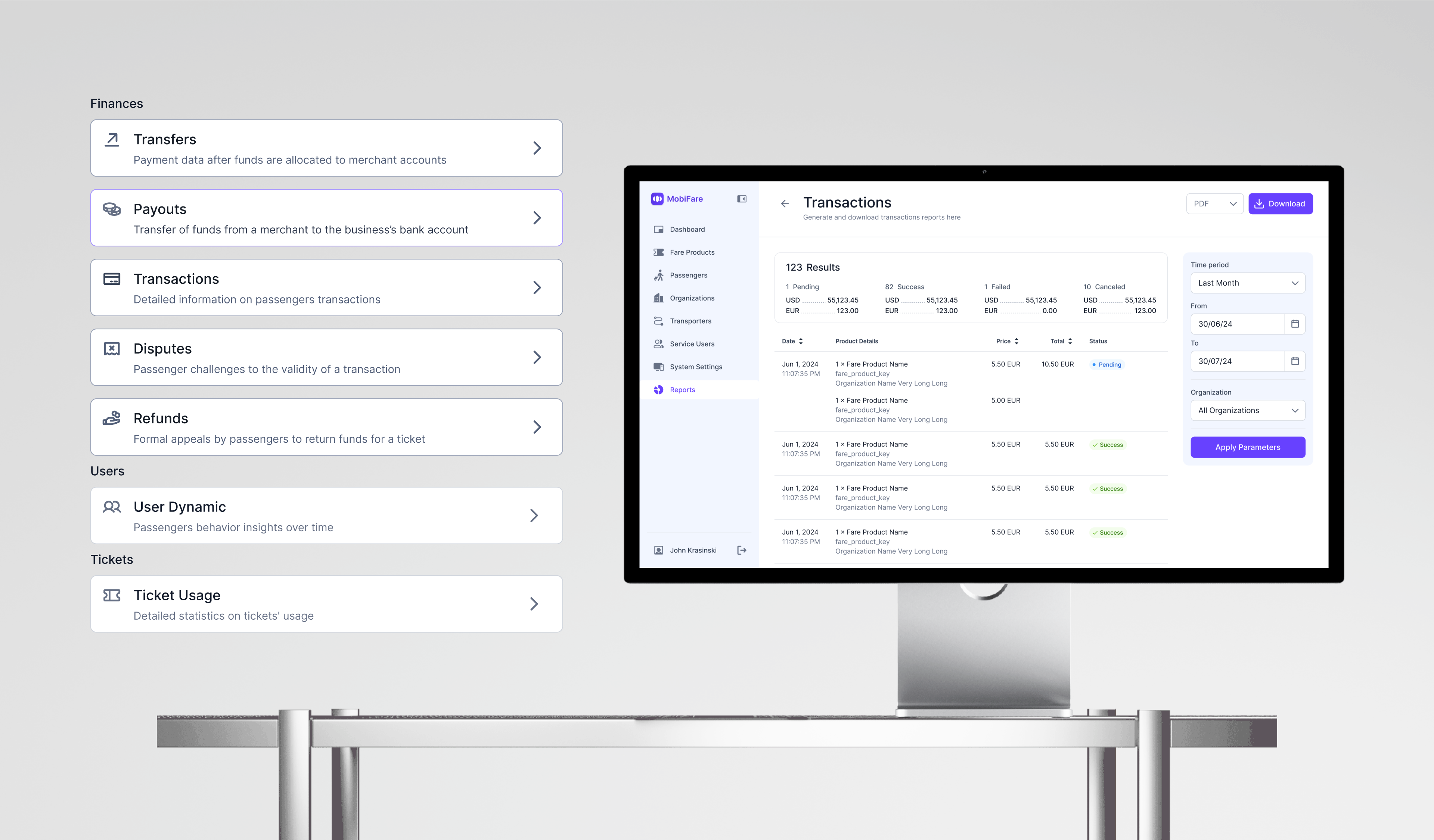
Administrators rely on reporting to monitor transport operations across different organizational levels.
The reporting experience supports printable PDF reports for sales, usage, and system activity, enabling stakeholders to monitor operations consistently across every administrative level.
08/
Design System
Building a Design System
As the platform expanded, maintaining consistency became increasingly important.
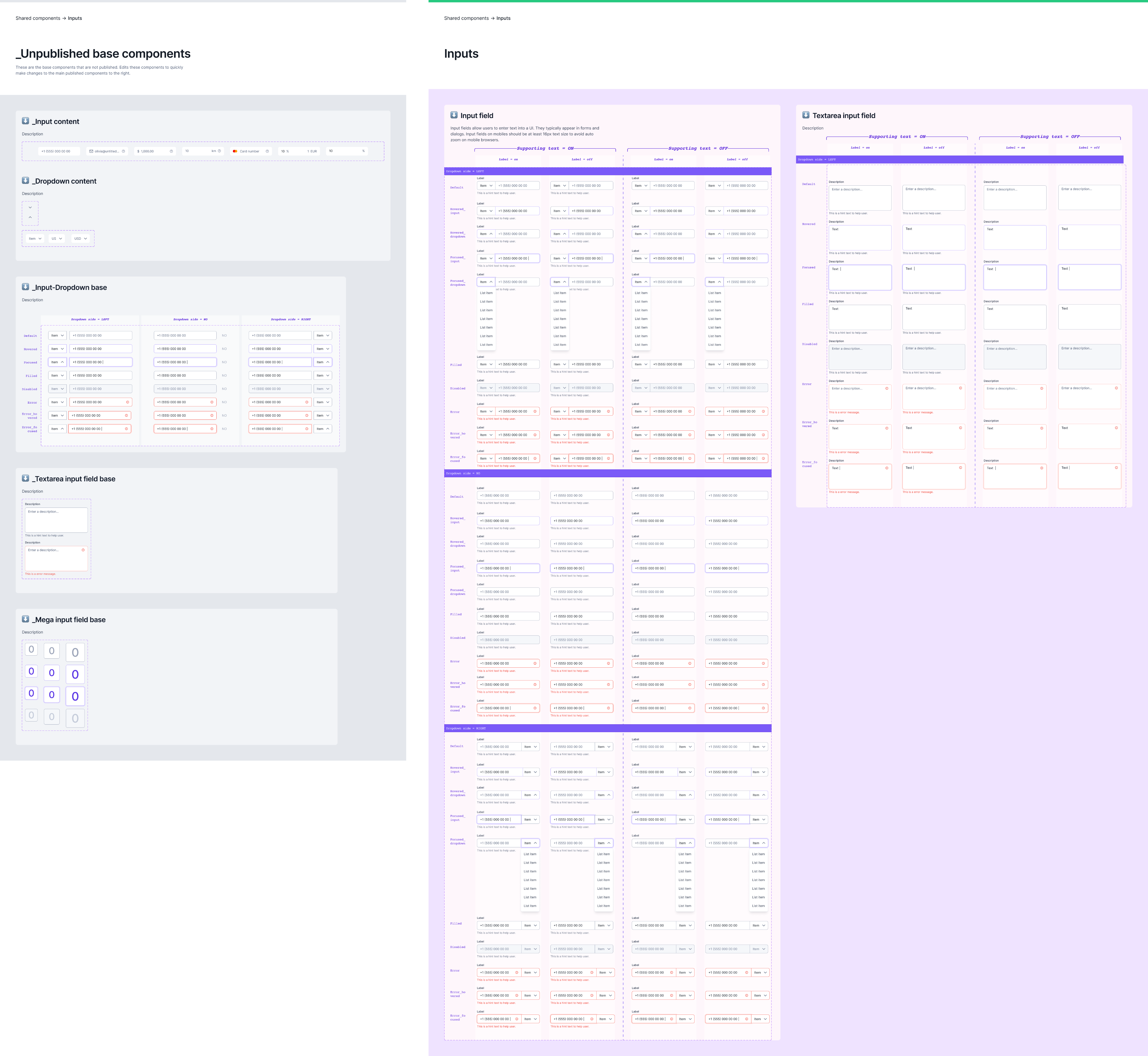
To support future growth, a shared component library and reusable layout framework were developed.
The design system standardized:
- Components
- Layout templates
- Spacing
- Color system
- Icons
- Interaction patterns
This created a more scalable foundation for future product development.
09/
Results
Measurable outcomes
Delivered across a 10-month timeline, improving workflows at every organizational level.
↑
Faster onboarding
Simplified organization setup reduced the effort required to configure new transport providers.
↓
Less confusion
Clearer role definitions reduced cross-level confusion
↯
Faster support
Support workflows streamlined through unified tools
∞
Scalable system
System scales better with new roles and features over time
10/
Reflection
Key Takeaways
This project highlighted how critical information architecture becomes as enterprise products grow in complexity.
One of the biggest challenges was balancing consistency with flexibility. Rather than designing separate experiences for each administrative role, the solution focused on creating a shared framework that adapts to different permissions while maintaining a familiar user experience.
This approach established a scalable foundation that can continue evolving as the platform grows.


Previous Project
Events App
Next Project
Workforce Management Software

© 2026 Tseux. All rights reserved. Made with intent.
Back to All Works
Smart Ticketing BackOffice
A scalable back-office platform for managing public transport operations across multiple organizations and administrative levels.
Scope
Enterprise Product Design · Information Architecture · Design System
Platform
Web Application
Timeline
10 months
YEAR
2024

01/
Background
Project Context
Smart Ticketing is an internal web platform used to manage transport organizations, fare products, passengers, reporting, and support operations.
The platform supports multiple administrative levels, each responsible for different aspects of transport operations. Rather than building separate interfaces for each role, the goal was to create a unified experience that adapts to role-specific permissions while maintaining consistency across the product.
02/
Problem
The Challenge
Designing a back-office platform for public transport providers required balancing flexibility with consistency across multiple administrative levels. Different users needed access to different tools, permissions, and workflows while working within the same system.
Several design challenges shaped the project:
- Supporting multiple permission levels within one product
- Creating consistent navigation across different user roles
- Simplifying complex administrative workflows
- Building reusable UI patterns for future scalability
- Maintaining consistency across a growing platform
03/
Roles & Access
Role-Based Navigation
Although users share the same product, each administrative level requires different responsibilities, permissions, and workflows. The navigation adapts accordingly while preserving a consistent mental model across the platform.
Platform Level
Provides centralized administration for managing organizations, global settings, reporting, and platform-wide configurations.
Organization Level
Supports day-to-day management of transport networks, fare products, inspections, and passengers within a single organization.
Transporter Level
Focuses on operational workflows such as passenger management, fare products, reporting, and support for individual transport providers.
04/
Setup
Organization Onboarding
Setting up a new organization involves multiple operational steps, including platform configuration, organization setup, payment integration, document verification, and transport network configuration.
The experience brings these related tasks into a structured workflow that helps administrators complete setup efficiently.
05/
Ticket Management
Fare Product Management
Fare products are one of the platform's core management areas.
The interface was designed to simplify creating, editing, and reviewing transport tickets while maintaining consistency across different organizations and administrative levels.
06/
Support & Refunds
Support & Refund Tools
Customer support teams need fast access to passenger information and operational tools when resolving issues.
The platform centralizes support requests and refund workflows, helping operators handle common administrative tasks from a single interface.
This reduces context switching and enables faster issue resolution for support teams.
07/
Operational Reports
Operational Reports
Administrators rely on reporting to monitor transport operations across different organizational levels.
The reporting experience supports printable PDF reports for sales, usage, and system activity, enabling stakeholders to monitor operations consistently across every administrative level.
08/
Design System
Building a Design System
As the platform expanded, maintaining consistency became increasingly important.
To support future growth, a shared component library and reusable layout framework were developed.
The design system standardized:
- Components
- Layout templates
- Spacing
- Color system
- Icons
- Interaction patterns
This created a more scalable foundation for future product development.
09/
Results
Measurable outcomes
Delivered across a 10-month timeline, improving workflows at every organizational level.
↑
Faster onboarding
Simplified organization setup reduced the effort required to configure new transport providers.
↓
Less confusion
Clearer role definitions reduced cross-level confusion
↯
Faster support
Support workflows streamlined through unified tools
∞
Scalable system
System scales better with new roles and features over time
10/
Reflection
Key Takeaways
This project highlighted how critical information architecture becomes as enterprise products grow in complexity.
One of the biggest challenges was balancing consistency with flexibility. Rather than designing separate experiences for each administrative role, the solution focused on creating a shared framework that adapts to different permissions while maintaining a familiar user experience.
This approach established a scalable foundation that can continue evolving as the platform grows.
Previous Project
Events App
Next Project
Workforce Management Software
© 2026 Tseux. All rights reserved. Made with intent.
Back to All Works
Smart Ticketing BackOffice
A scalable back-office platform for managing public transport operations across multiple organizations and administrative levels.
Scope
Enterprise Product Design · Information Architecture · Design System
Platform
Web Application
Timeline
10 months
YEAR
2024

01/
Background
Project Context
Smart Ticketing is an internal web platform used to manage transport organizations, fare products, passengers, reporting, and support operations.
The platform supports multiple administrative levels, each responsible for different aspects of transport operations. Rather than building separate interfaces for each role, the goal was to create a unified experience that adapts to role-specific permissions while maintaining consistency across the product.
02/
Problem
The Challenge
Designing a back-office platform for public transport providers required balancing flexibility with consistency across multiple administrative levels. Different users needed access to different tools, permissions, and workflows while working within the same system.
Several design challenges shaped the project:
- Supporting multiple permission levels within one product
- Creating consistent navigation across different user roles
- Simplifying complex administrative workflows
- Building reusable UI patterns for future scalability
- Maintaining consistency across a growing platform
03/
Roles & Access
Role-Based Navigation
Although users share the same product, each administrative level requires different responsibilities, permissions, and workflows. The navigation adapts accordingly while preserving a consistent mental model across the platform.
Platform Level
Provides centralized administration for managing organizations, global settings, reporting, and platform-wide configurations.
Organization Level
Supports day-to-day management of transport networks, fare products, inspections, and passengers within a single organization.
Transporter Level
Focuses on operational workflows such as passenger management, fare products, reporting, and support for individual transport providers.
04/
Setup
Organization Onboarding
Setting up a new organization involves multiple operational steps, including platform configuration, organization setup, payment integration, document verification, and transport network configuration.
The experience brings these related tasks into a structured workflow that helps administrators complete setup efficiently.
05/
Ticket Management
Fare Product Management
Fare products are one of the platform's core management areas.
The interface was designed to simplify creating, editing, and reviewing transport tickets while maintaining consistency across different organizations and administrative levels.
06/
Support & Refunds
Support & Refund Tools
Customer support teams need fast access to passenger information and operational tools when resolving issues.
The platform centralizes support requests and refund workflows, helping operators handle common administrative tasks from a single interface.
This reduces context switching and enables faster issue resolution for support teams.
07/
Operational Reports
Operational Reports
Administrators rely on reporting to monitor transport operations across different organizational levels.
The reporting experience supports printable PDF reports for sales, usage, and system activity, enabling stakeholders to monitor operations consistently across every administrative level.
08/
Design System
Building a Design System
As the platform expanded, maintaining consistency became increasingly important.
To support future growth, a shared component library and reusable layout framework were developed.
The design system standardized:
- Components
- Layout templates
- Spacing
- Color system
- Icons
- Interaction patterns
This created a more scalable foundation for future product development.
09/
Results
Measurable outcomes
Delivered across a 10-month timeline, improving workflows at every organizational level.
↑
Faster onboarding
Simplified organization setup reduced the effort required to configure new transport providers.
↓
Less confusion
Clearer role definitions reduced cross-level confusion
↯
Faster support
Support workflows streamlined through unified tools
∞
Scalable system
System scales better with new roles and features over time
10/
Reflection
Key Takeaways
This project highlighted how critical information architecture becomes as enterprise products grow in complexity.
One of the biggest challenges was balancing consistency with flexibility. Rather than designing separate experiences for each administrative role, the solution focused on creating a shared framework that adapts to different permissions while maintaining a familiar user experience.
This approach established a scalable foundation that can continue evolving as the platform grows.
Previous Project
Events App
Next Project
Workforce Management Software
© 2026 Tseux. All rights reserved. Made with intent.
Back to All Works
Smart Ticketing BackOffice
A scalable back-office platform for managing public transport operations across multiple organizations and administrative levels.
Scope
Enterprise Product Design · Information Architecture · Design System
Platform
Web Application
Timeline
10 months
YEAR
2024

01/
Background
Project Context
Smart Ticketing is an internal web platform used to manage transport organizations, fare products, passengers, reporting, and support operations.
The platform supports multiple administrative levels, each responsible for different aspects of transport operations. Rather than building separate interfaces for each role, the goal was to create a unified experience that adapts to role-specific permissions while maintaining consistency across the product.
02/
Problem
The Challenge
Designing a back-office platform for public transport providers required balancing flexibility with consistency across multiple administrative levels. Different users needed access to different tools, permissions, and workflows while working within the same system.
Several design challenges shaped the project:
- Supporting multiple permission levels within one product
- Creating consistent navigation across different user roles
- Simplifying complex administrative workflows
- Building reusable UI patterns for future scalability
- Maintaining consistency across a growing platform
03/
Roles & Access
Role-Based Navigation
Although users share the same product, each administrative level requires different responsibilities, permissions, and workflows. The navigation adapts accordingly while preserving a consistent mental model across the platform.
Platform Level
Provides centralized administration for managing organizations, global settings, reporting, and platform-wide configurations.
Organization Level
Supports day-to-day management of transport networks, fare products, inspections, and passengers within a single organization.
Transporter Level
Focuses on operational workflows such as passenger management, fare products, reporting, and support for individual transport providers.
04/
Setup
Organization Onboarding
Setting up a new organization involves multiple operational steps, including platform configuration, organization setup, payment integration, document verification, and transport network configuration.
The experience brings these related tasks into a structured workflow that helps administrators complete setup efficiently.
05/
Ticket Management
Fare Product Management
Fare products are one of the platform's core management areas.
The interface was designed to simplify creating, editing, and reviewing transport tickets while maintaining consistency across different organizations and administrative levels.
06/
Support & Refunds
Support & Refund Tools
Customer support teams need fast access to passenger information and operational tools when resolving issues.
The platform centralizes support requests and refund workflows, helping operators handle common administrative tasks from a single interface.
This reduces context switching and enables faster issue resolution for support teams.
07/
Operational Reports
Operational Reports
Administrators rely on reporting to monitor transport operations across different organizational levels.
The reporting experience supports printable PDF reports for sales, usage, and system activity, enabling stakeholders to monitor operations consistently across every administrative level.
08/
Design System
Building a Design System
As the platform expanded, maintaining consistency became increasingly important.
To support future growth, a shared component library and reusable layout framework were developed.
The design system standardized:
- Components
- Layout templates
- Spacing
- Color system
- Icons
- Interaction patterns
This created a more scalable foundation for future product development.
09/
Results
Measurable outcomes
Delivered across a 10-month timeline, improving workflows at every organizational level.
↑
Faster onboarding
Simplified organization setup reduced the effort required to configure new transport providers.
↓
Less confusion
Clearer role definitions reduced cross-level confusion
↯
Faster support
Support workflows streamlined through unified tools
∞
Scalable system
System scales better with new roles and features over time
10/
Reflection
Key Takeaways
This project highlighted how critical information architecture becomes as enterprise products grow in complexity.
One of the biggest challenges was balancing consistency with flexibility. Rather than designing separate experiences for each administrative role, the solution focused on creating a shared framework that adapts to different permissions while maintaining a familiar user experience.
This approach established a scalable foundation that can continue evolving as the platform grows.
Previous Project
Events App
Next Project
Workforce Management Software
© 2026 Tseux. All rights reserved. Made with intent.
Back to All Works
Smart Ticketing BackOffice
A scalable back-office platform for managing public transport operations across multiple organizations and administrative levels.
Scope
Enterprise Product Design · Information Architecture · Design System
Platform
Web Application
Timeline
10 months
YEAR
2024

01/
Background
Project Context
Smart Ticketing is an internal web platform used to manage transport organizations, fare products, passengers, reporting, and support operations.
The platform supports multiple administrative levels, each responsible for different aspects of transport operations. Rather than building separate interfaces for each role, the goal was to create a unified experience that adapts to role-specific permissions while maintaining consistency across the product.
02/
Problem
The Challenge
Designing a back-office platform for public transport providers required balancing flexibility with consistency across multiple administrative levels. Different users needed access to different tools, permissions, and workflows while working within the same system.
Several design challenges shaped the project:
- Supporting multiple permission levels within one product
- Creating consistent navigation across different user roles
- Simplifying complex administrative workflows
- Building reusable UI patterns for future scalability
- Maintaining consistency across a growing platform
03/
Roles & Access
Role-Based Navigation
Although users share the same product, each administrative level requires different responsibilities, permissions, and workflows. The navigation adapts accordingly while preserving a consistent mental model across the platform.
Platform Level
Provides centralized administration for managing organizations, global settings, reporting, and platform-wide configurations.
Organization Level
Supports day-to-day management of transport networks, fare products, inspections, and passengers within a single organization.
Transporter Level
Focuses on operational workflows such as passenger management, fare products, reporting, and support for individual transport providers.
04/
Setup
Organization Onboarding
Setting up a new organization involves multiple operational steps, including platform configuration, organization setup, payment integration, document verification, and transport network configuration.
The experience brings these related tasks into a structured workflow that helps administrators complete setup efficiently.
05/
Ticket Management
Fare Product Management
Fare products are one of the platform's core management areas.
The interface was designed to simplify creating, editing, and reviewing transport tickets while maintaining consistency across different organizations and administrative levels.
06/
Support & Refunds
Support & Refund Tools
Customer support teams need fast access to passenger information and operational tools when resolving issues.
The platform centralizes support requests and refund workflows, helping operators handle common administrative tasks from a single interface.
This reduces context switching and enables faster issue resolution for support teams.
07/
Operational Reports
Operational Reports
Administrators rely on reporting to monitor transport operations across different organizational levels.
The reporting experience supports printable PDF reports for sales, usage, and system activity, enabling stakeholders to monitor operations consistently across every administrative level.
08/
Design System
Building a Design System
As the platform expanded, maintaining consistency became increasingly important.
To support future growth, a shared component library and reusable layout framework were developed.
The design system standardized:
- Components
- Layout templates
- Spacing
- Color system
- Icons
- Interaction patterns
This created a more scalable foundation for future product development.
09/
Results
Measurable outcomes
Delivered across a 10-month timeline, improving workflows at every organizational level.
↑
Faster onboarding
Simplified organization setup reduced the effort required to configure new transport providers.
↓
Less confusion
Clearer role definitions reduced cross-level confusion
↯
Faster support
Support workflows streamlined through unified tools
∞
Scalable system
System scales better with new roles and features over time
10/
Reflection
Key Takeaways
This project highlighted how critical information architecture becomes as enterprise products grow in complexity.
One of the biggest challenges was balancing consistency with flexibility. Rather than designing separate experiences for each administrative role, the solution focused on creating a shared framework that adapts to different permissions while maintaining a familiar user experience.
This approach established a scalable foundation that can continue evolving as the platform grows.
Previous Project
Events App
Next Project
Workforce Management Software
© 2026 Tseux. All rights reserved. Made with intent.
Back to All Works
Smart Ticketing BackOffice
A scalable back-office platform for managing public transport operations across multiple organizations and administrative levels.
Scope
Enterprise Product Design · Information Architecture · Design System
Platform
Web Application
Timeline
10 months
YEAR
2024

01/
Background
Project Context
Smart Ticketing is an internal web platform used to manage transport organizations, fare products, passengers, reporting, and support operations.
The platform supports multiple administrative levels, each responsible for different aspects of transport operations. Rather than building separate interfaces for each role, the goal was to create a unified experience that adapts to role-specific permissions while maintaining consistency across the product.
02/
Problem
The Challenge
Designing a back-office platform for public transport providers required balancing flexibility with consistency across multiple administrative levels. Different users needed access to different tools, permissions, and workflows while working within the same system.
Several design challenges shaped the project:
- Supporting multiple permission levels within one product
- Creating consistent navigation across different user roles
- Simplifying complex administrative workflows
- Building reusable UI patterns for future scalability
- Maintaining consistency across a growing platform
03/
Roles & Access
Role-Based Navigation
Although users share the same product, each administrative level requires different responsibilities, permissions, and workflows. The navigation adapts accordingly while preserving a consistent mental model across the platform.
Platform Level
Provides centralized administration for managing organizations, global settings, reporting, and platform-wide configurations.
Organization Level
Supports day-to-day management of transport networks, fare products, inspections, and passengers within a single organization.
Transporter Level
Focuses on operational workflows such as passenger management, fare products, reporting, and support for individual transport providers.
04/
Setup
Organization Onboarding
Setting up a new organization involves multiple operational steps, including platform configuration, organization setup, payment integration, document verification, and transport network configuration.
The experience brings these related tasks into a structured workflow that helps administrators complete setup efficiently.
05/
Ticket Management
Fare Product Management
Fare products are one of the platform's core management areas.
The interface was designed to simplify creating, editing, and reviewing transport tickets while maintaining consistency across different organizations and administrative levels.
06/
Support & Refunds
Support & Refund Tools
Customer support teams need fast access to passenger information and operational tools when resolving issues.
The platform centralizes support requests and refund workflows, helping operators handle common administrative tasks from a single interface.
This reduces context switching and enables faster issue resolution for support teams.
07/
Operational Reports
Operational Reports
Administrators rely on reporting to monitor transport operations across different organizational levels.
The reporting experience supports printable PDF reports for sales, usage, and system activity, enabling stakeholders to monitor operations consistently across every administrative level.
08/
Design System
Building a Design System
As the platform expanded, maintaining consistency became increasingly important.
To support future growth, a shared component library and reusable layout framework were developed.
The design system standardized:
- Components
- Layout templates
- Spacing
- Color system
- Icons
- Interaction patterns
This created a more scalable foundation for future product development.
09/
Results
Measurable outcomes
Delivered across a 10-month timeline, improving workflows at every organizational level.
↑
Faster onboarding
Simplified organization setup reduced the effort required to configure new transport providers.
↓
Less confusion
Clearer role definitions reduced cross-level confusion
↯
Faster support
Support workflows streamlined through unified tools
∞
Scalable system
System scales better with new roles and features over time
10/
Reflection
Key Takeaways
This project highlighted how critical information architecture becomes as enterprise products grow in complexity.
One of the biggest challenges was balancing consistency with flexibility. Rather than designing separate experiences for each administrative role, the solution focused on creating a shared framework that adapts to different permissions while maintaining a familiar user experience.
This approach established a scalable foundation that can continue evolving as the platform grows.
Previous Project
Events App
Next Project
Workforce Management Software
© 2026 Tseux. All rights reserved. Made with intent.
Smart Ticketing BackOffice
A scalable back-office platform for managing public transport operations across multiple organizations and administrative levels.
Back to All Works
Scope
Enterprise Product Design · Information Architecture · Design System
Platform
Web Application
Timeline
10 months
YEAR
2024

01/
Background
Project Context
Smart Ticketing is an internal web platform used to manage transport organizations, fare products, passengers, reporting, and support operations.
The platform supports multiple administrative levels, each responsible for different aspects of transport operations. Rather than building separate interfaces for each role, the goal was to create a unified experience that adapts to role-specific permissions while maintaining consistency across the product.
02/
Problem
The Challenge
Designing a back-office platform for public transport providers required balancing flexibility with consistency across multiple administrative levels. Different users needed access to different tools, permissions, and workflows while working within the same system.
Several design challenges shaped the project:
- Supporting multiple permission levels within one product
- Creating consistent navigation across different user roles
- Simplifying complex administrative workflows
- Building reusable UI patterns for future scalability
- Maintaining consistency across a growing platform
03/
Roles & Access
Role-Based Navigation
Although users share the same product, each administrative level requires different responsibilities, permissions, and workflows. The navigation adapts accordingly while preserving a consistent mental model across the platform.
Platform Level
Provides centralized administration for managing organizations, global settings, reporting, and platform-wide configurations.
Organization Level
Supports day-to-day management of transport networks, fare products, inspections, and passengers within a single organization.
Transporter Level
Focuses on operational workflows such as passenger management, fare products, reporting, and support for individual transport providers.
04/
Setup
Organization Onboarding
Setting up a new organization involves multiple operational steps, including platform configuration, organization setup, payment integration, document verification, and transport network configuration.
The experience brings these related tasks into a structured workflow that helps administrators complete setup efficiently.
05/
Ticket Management
Fare Product Management
Fare products are one of the platform's core management areas.
The interface was designed to simplify creating, editing, and reviewing transport tickets while maintaining consistency across different organizations and administrative levels.
06/
Support & Refunds
Support & Refund Tools
Customer support teams need fast access to passenger information and operational tools when resolving issues.
The platform centralizes support requests and refund workflows, helping operators handle common administrative tasks from a single interface.
This reduces context switching and enables faster issue resolution for support teams.
07/
Operational Reports
Operational Reports
Administrators rely on reporting to monitor transport operations across different organizational levels.
The reporting experience supports printable PDF reports for sales, usage, and system activity, enabling stakeholders to monitor operations consistently across every administrative level.
08/
Design System
Building a Design System
As the platform expanded, maintaining consistency became increasingly important.
To support future growth, a shared component library and reusable layout framework were developed.
The design system standardized:
- Components
- Layout templates
- Spacing
- Color system
- Icons
- Interaction patterns
This created a more scalable foundation for future product development.
09/
Results
Measurable outcomes
Delivered across a 10-month timeline, improving workflows at every organizational level.
↑
Faster onboarding
Simplified organization setup reduced the effort required to configure new transport providers.
↓
Less confusion
Clearer role definitions reduced cross-level confusion
↯
Faster support
Support workflows streamlined through unified tools
∞
Scalable system
System scales better with new roles and features over time
10/
Reflection
Key Takeaways
This project highlighted how critical information architecture becomes as enterprise products grow in complexity.
One of the biggest challenges was balancing consistency with flexibility. Rather than designing separate experiences for each administrative role, the solution focused on creating a shared framework that adapts to different permissions while maintaining a familiar user experience.
This approach established a scalable foundation that can continue evolving as the platform grows.
Previous Project
Events App
Next Project
Workforce Management Software
© 2026 Tseux. All rights reserved. Made with intent.